Category: Technology

  • PayPal Verification: Quickest Way to Provide Proof of Address in Kenya in 2026

    PayPal Verification: Quickest Way to Provide Proof of Address in Kenya in 2026

    Today, I’ll show you one document that you can submit as proof of address in the PayPal verification process for a personal account and get through in just a few minutes!

    It’s one that I have tried and tested, and it works.

    I’ll also show you what to do when PayPal tells you that your document is out of date.

    What documents can be used to verify an address?

    First, let’s dig a little deeper into why this is a challenge for Kenyans.

    For proof of address, PayPal asks for a utility bill, bank or credit card statement, or a government-issued document in your name.

    A utility bill means a gas bill, water bill, phone bill, or electricity bill.

    The problem

    But how many Kenyans receive utility bills in document form?

    You’re right— very few. Even the electricity bill sent via Posta (I don’t know if they send them anymore) will probably be in your parents’ name and not yours.

    If you have one, well and good. The point is, such bills are not common in Kenya.

    What about a credit card statement? Again, not a common thing in Kenya.

    Hang on, because we’re going to explore the remaining options in a bit.

    For those new to PayPal, here’s what you need to know.

    PayPal is an online service that lets you easily send or receive money and pay for online goods and services. It’s useful, especially when the person or company you’re transacting with is abroad.

    After you’ve made several transactions in your new account, PayPal will invite you to verify your identity. Proof of address is one step in the verification process.

    Other steps include uploading your photo and ID, and verifying your credit card.

    PayPal doesn’t say how much money you’ll transact in an account before they ask you to verify your account. It’s only important to know that it will be a requirement down the road.

    Why PayPal needs to know your address

    Proof of address confirms your residence details. It will prove that you are indeed who you claim to be.

    This helps curb online fraud and money laundering and ensures every transaction is legal and traceable to a genuine person. Those who have had an account for a while know PayPal takes security very seriously.

    The solution

    Now, back to the proof of address problem. The solution for Kenyans actually lies with the remaining two options: Bank statement and government-issued document.

    So yes, one simpler option is to visit your bank and request your account statement. Confirm that the personal details match what is on your PayPal account before you submit the document, and voila! It’s that simple.

    But what if you’re busy and can’t find time to visit the bank? Or you don’t feel like visiting the bank? (Picture the long queues). Is there an alternative?

    Yes, there is.

    Enter government-issued document. It’s the simplest option and my recommendation to you.

    And the best part? You can do this without leaving the comfort of your house.

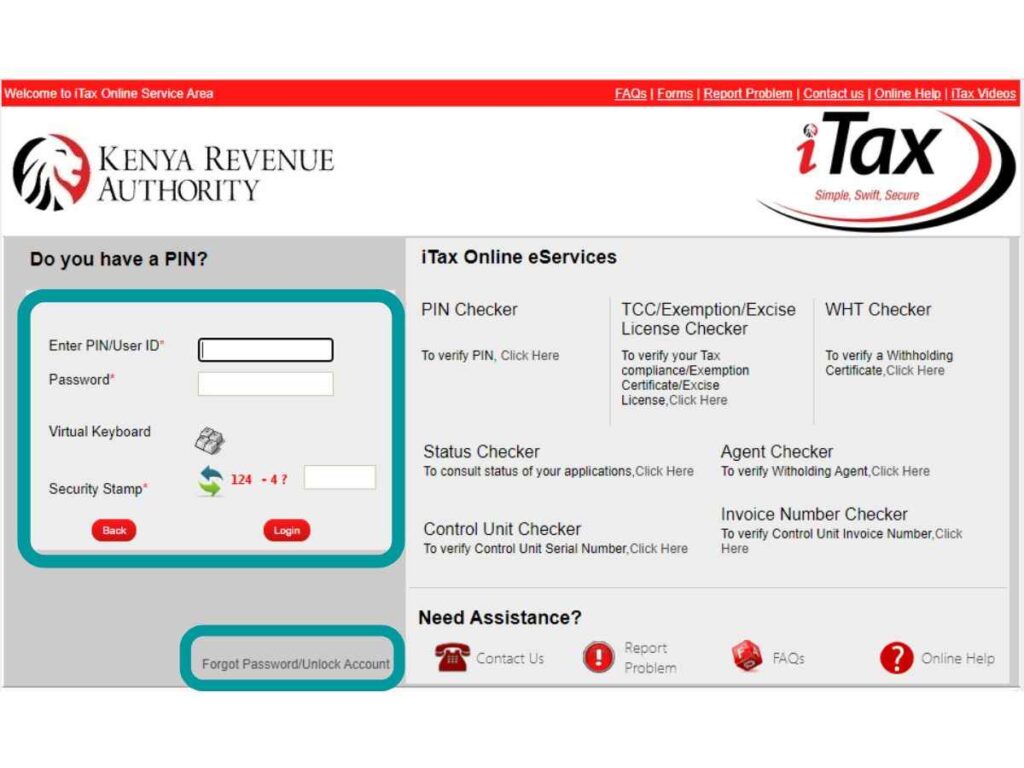
    If you’ve forgotten your password, click on “forgot password” at the bottom of the screen. You will receive an email with a new password, which you’ll use to log in with.

    You’ll then be asked to create a new password. Use the password you’ve created to log in.

    Reprint the KRA PIN certificate

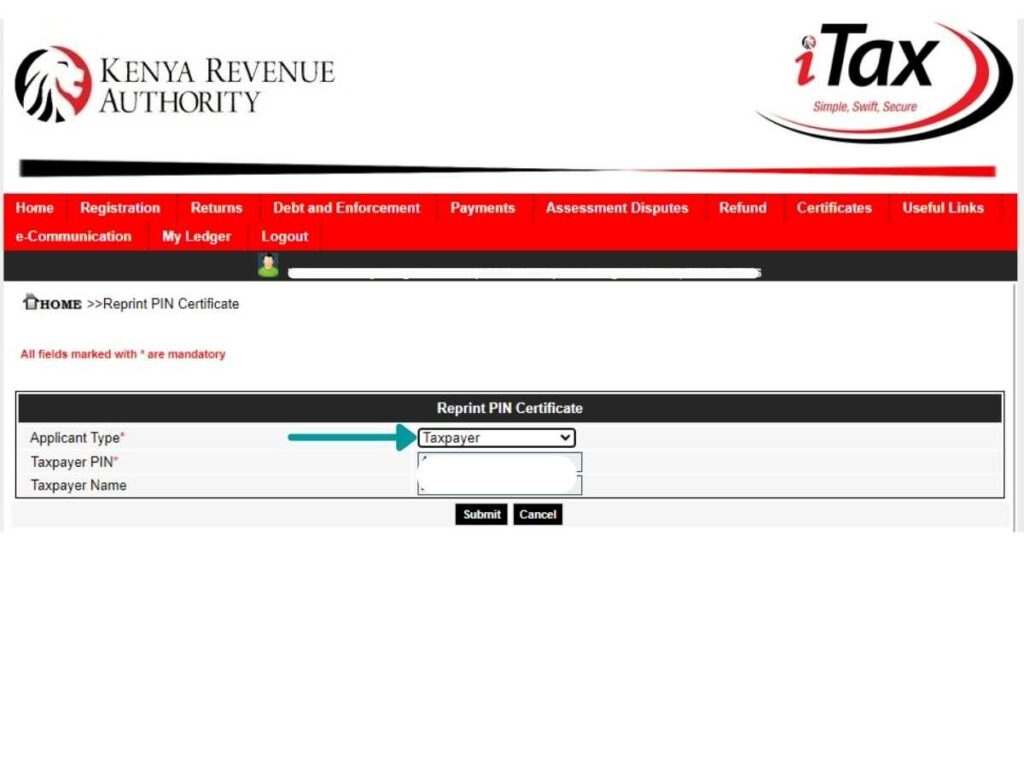
    Once you’re logged in, click on Registration, then select Reprint PIN Certificate.
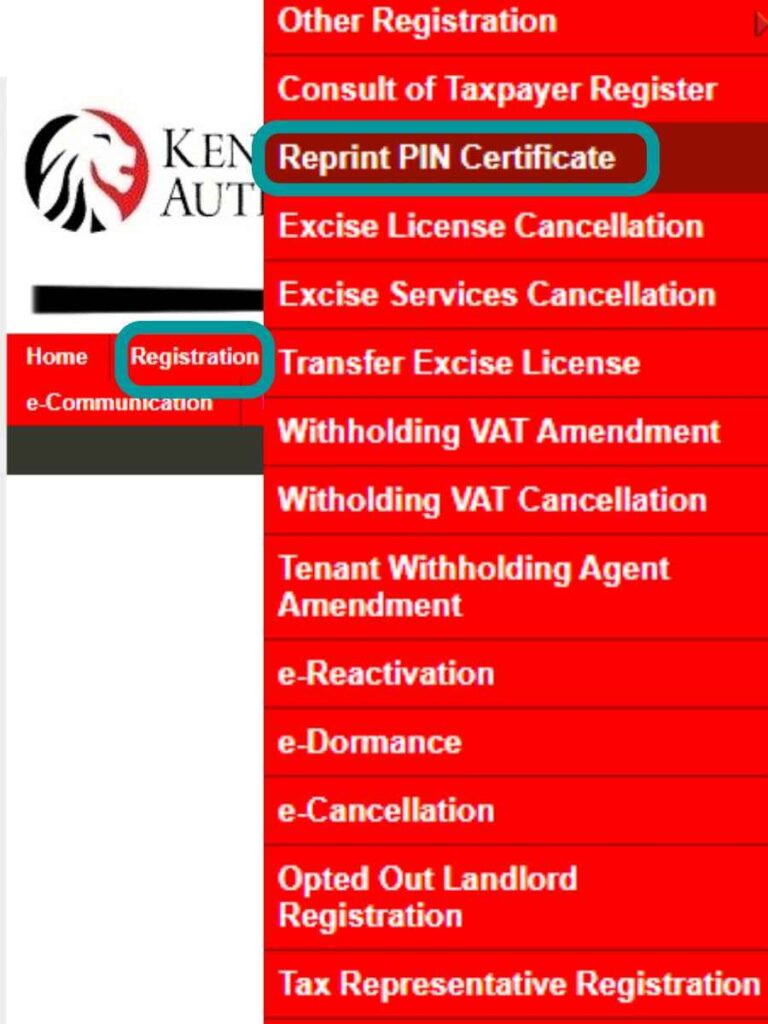
    For Applicant Type, select Taxpayer, then click Submit.
    You will receive an email with the PIN certificate attached as a document. Alternatively, click where it’s written: “Click here to download PIN certificate” to download it directly to your device.
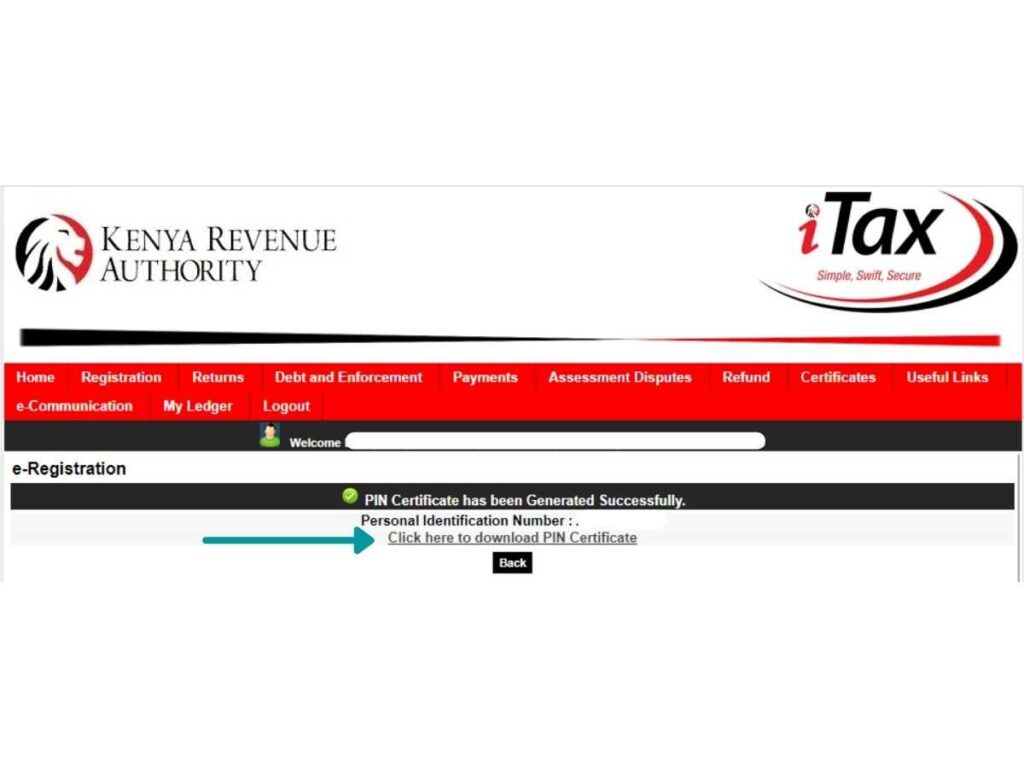
    Use that to submit to PayPal as proof of address.

    If you decide to use one you had downloaded before, make sure it’s not older than 6 months. Otherwise, it’ll be rejected.

    That happened to me. I submitted one that I had downloaded a few years ago. Do you know those documents that you keep in your email as attachments for future job applications? Yes, those.

    PayPal says, “The document is out of date.”

    I’ve had some people tell me that even after downloading, the date on the KRA PIN shows the day they first applied for it and not the day they downloaded it.

    Most times, that date is over 6 months back and is bound to be rejected by PayPal, should you submit it.

    So what do you do?

    You’ll solve this by amending PIN details.

    But what if every detail on your document is correct and nothing needs to be changed? 

    Then you don’t need to update anything. Just follow the steps below and at the end click Submit.

    Here’s how:

    Amend PIN details (if necessary)

    IMPORTANT: Before you consider amending details on your KRA account, know that some changes require approval from KRA and may take days to get approved.

    It’s much easier, therefore, to update the details on your PayPal account to match what is in the KRA account.

    But if the details in your KRA account like P.O. Box and Zip code are actually outdated, or you want to solve the date issue, you may update them by clicking Registration, then Amend PIN Details from the pop-up list.
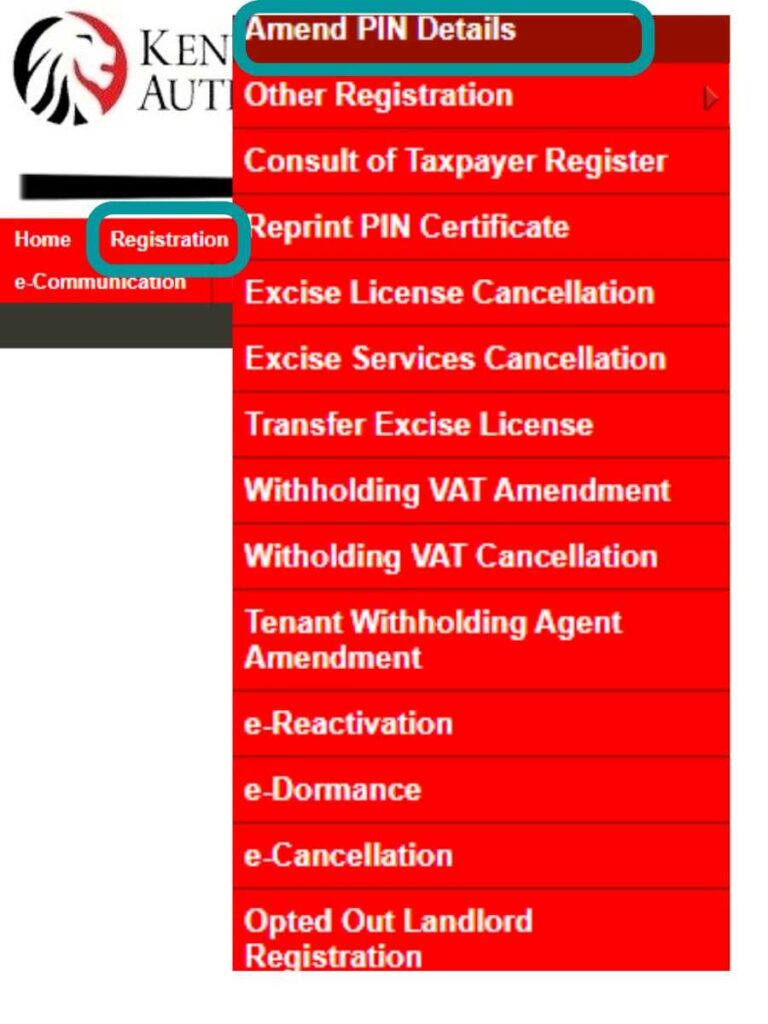
    For Mode of Amendment, click on Online Form, then click Next.

    It will open to a window like the one below.
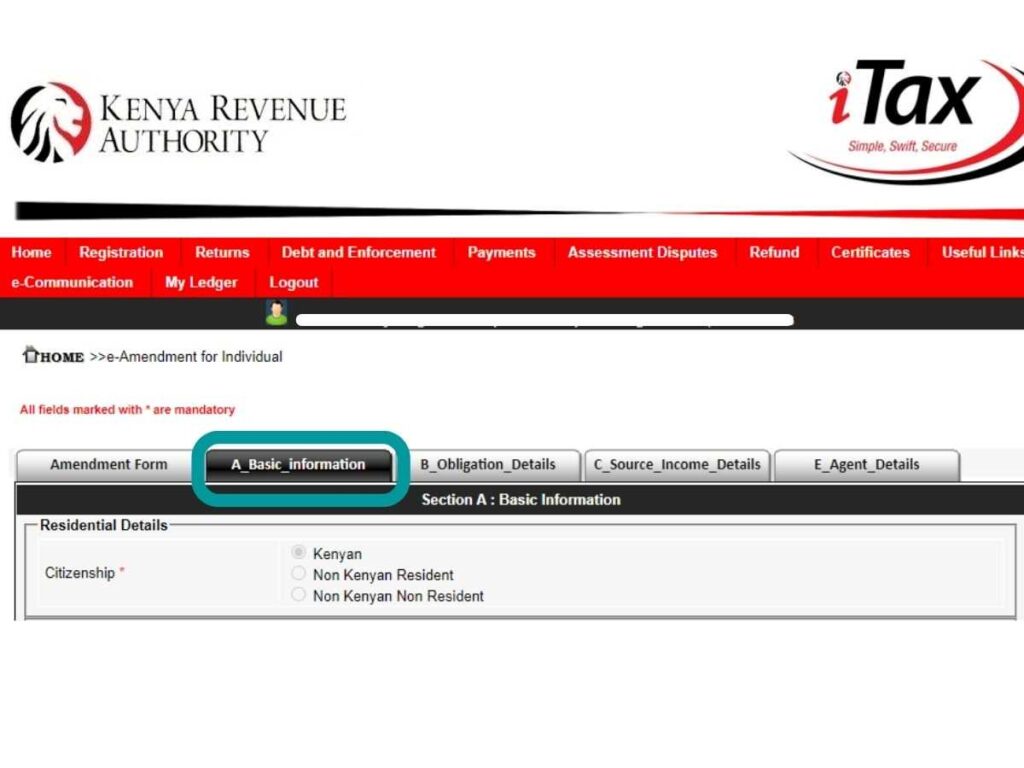
    Under the Amendment Form tab, tick the PIN and Basic Information boxes. Then click Next.

    It’ll take you to the Basic Information tab, which will look like the one below.
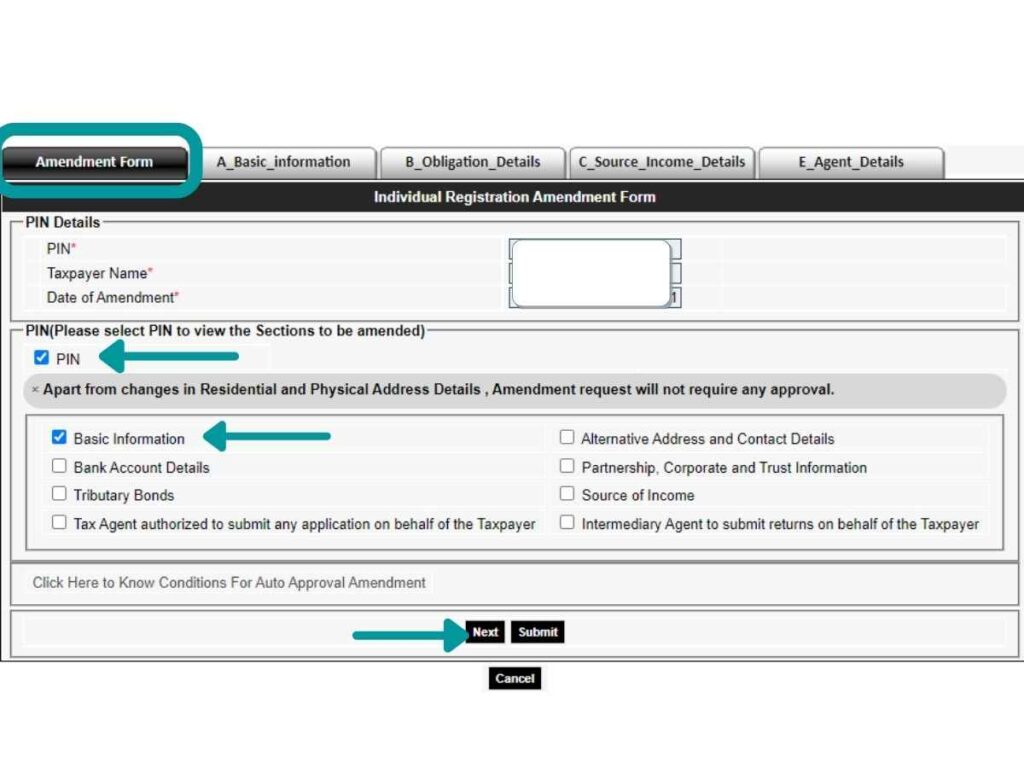
    Update the details that are outdated. Remember, if there is nothing to be updated, and all looks good, simply click Submit.

    Now the date on the document will automatically capture that day’s date and you’ll have solved the out-of-date issue. 

    You will receive an email from KRA approving your changes, and your PIN document as an attachment.

    Or, to download it directly to your device, click where it’s written “Click here to download PIN Certificate.”

    Use that to submit to PayPal as your proof of address.

    That’s it!

    Use those steps to reprint your PIN certificate for any other official use, like when opening or activating a dormant bank account, not just for PayPal proof of address.

    Can you skip PayPal verification?

    Now, this is important.

    Can you ignore the verification process and continue to use your account normally?

    No, you can’t.

    It’s not an option that you have. Unless you want to give up that account for good.

    Listen: Once PayPal invites you to verify your account, please do so promptly.

    By then, your account will be temporarily limited, and you can’t send or withdraw money. You’ll be able to receive money, yes, but it will be put on hold and you can’t do anything with it.

    Don’t worry, PayPal will lift the restrictions once you complete the verification process successfully.

    If you ignore this (and subsequent reminder emails), they’ll now limit your account permanently.

    Just ask around — this is one situation you don’t want to find yourself in.
  • Here’s Why You’re Getting Too Many Friend Requests on Facebook in 2026

    Here’s Why You’re Getting Too Many Friend Requests on Facebook in 2026

    Have you wondered why you receive too many friend requests on Facebook within a short time? Like 20, 50, 70? Or even 100? Where do these people suddenly come from? And where were they before?

    In this post, I’m going to tell you why it happens, and if it bothers you, what you can do about it.

    Look: You are not alone. A Google search reveals it’s a common question among Facebook users. The thing is, it would make sense if you have become famous — a celebrity — or you’ve recently been in the news or all over social media.

    But here you are, an ordinary citizen, minding your own business, then boom! You receive 150 friend requests. What’s the reason behind this phenomenon?

    Can Facebook send friend requests automatically?

    Before we proceed, let’s get this out of the way. Could it be that you receive many friend requests because Facebook is sending them to you automatically?

    Or put it this way: Does Facebook send friend requests to you by itself?

    The answer is no.

    You receive a friend request when someone clicks the Add Friend button on your profile. 

    I don’t know about third-party apps or software, but Facebook does not do this on anybody’s behalf.

    Just to be clear, this post is about friend requests from genuine people with genuine mutual friends and not about requests from spam or fake accounts.

    So if it’s not Facebook sending them automatically, then what’s behind this sudden avalanche of requests?

    And who would be in a better position to explain it than Facebook themselves?

    What Facebook says

    I had the privilege of accessing the Facebook Help Community before they dropped it in favor of the Help Center, particularly to search for this question. And this is what I realized: other users have asked the same question.

    Several times.

    Interestingly, the answer provided by Facebook is the same in all instances. They don’t give a direct answer.

    They only say that you can limit the number of requests you receive by allowing requests from friends of friends only instead of everyone.

    Okay, here’s what friends of friends means. For example, as I write this, I have 1630 friends on Facebook. If you are friends with any of those 1630, you are a friend of my friend and can send me a friend request. Anybody else outside that can’t. You can effect this by changing the Facebook friend request settings. Here’s how:

    (This is actually how to disable the friend request button.)

    Open Facebook

    Go to Settings & Privacy

    Click on Settings

    If you’re on a mobile phone, scroll down to Audience and Visibility. If you’re on a desktop, click on Privacy

    Then click on How People Find and Contact You

    Click on Who Can Send You Friend Requests?

    Select Your Friends of Friends

    Note that disabling the Add Friend button doesn’t mean that absolutely no one can send you a friend request. It means that the button is hidden to those who don’t share a mutual friend with you.

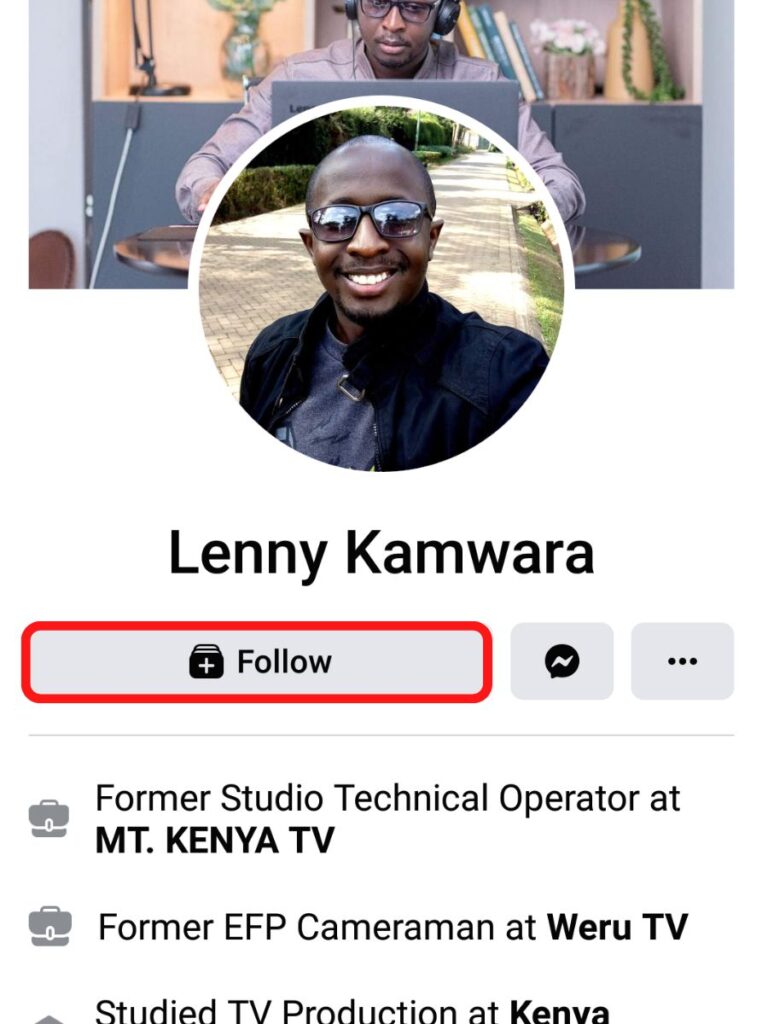
    And if they don’t share a mutual friend with you, here’s an example of what they’ll see when they visit your profile.

    The Add Friend icon is missing. In its place is the Follow button. Or, depending on your settings, the Message button.

    The alternative is to select Everyone, allowing friend requests from anyone on Facebook.

    Yes, the friends of friends setting reduces the number of requests that you’ll receive, but our question was why. Why do you receive many requests within a short time?

    The interesting thing I noticed

    I have had the friends of friends setting turned on for my account for close to 5 years now, but I still receive bouts of requests, even though occasionally. And a pattern has emerged.

    I realized that when I accept many friend requests within a short time, maybe within a day or two, I experience an influx of more requests.

    It’s like the Facebook algorithm interprets it as: “This person is currently open to making friends. It appears he is open to expanding his network. He wouldn’t mind accepting more.”

    Conversely, if I don’t accept friend requests and leave them hanging, even new ones cease to come my way.

    It’s like the algorithm now interprets it this way: “It seems he is currently not open to making more friends or he’s not open to expanding his network. It’s unlikely he’ll accept any more requests.”

    Here’s the reason it happens

    The reason for the increase in friend requests is that Facebook is showcasing your profile to many users through features like People You May Know and Friend Suggestions.

    The People You May Know section appears under Find Friends, but will occasionally appear in the News Feed or Notifications.

    Friend suggestions will appear under Notifications.

    Why do you appear in People You May Know?

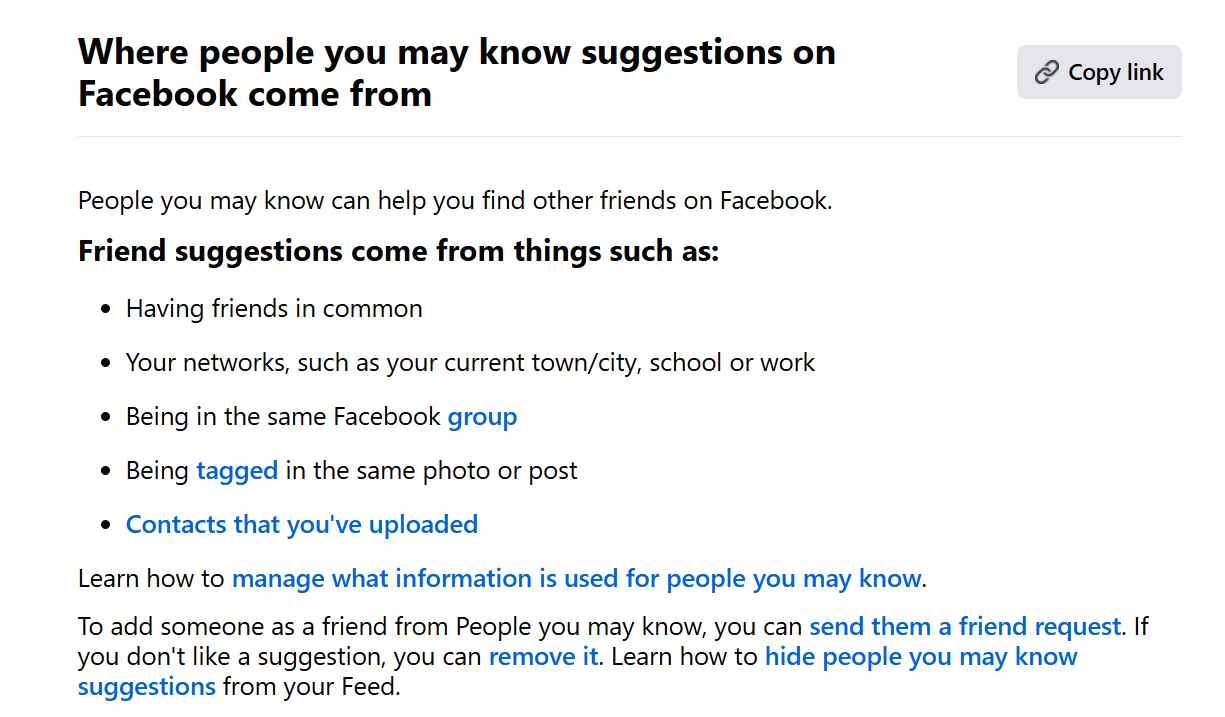
    Here’s what Facebook says:

    The uploaded contacts (when synced) is the reason you’ll save a contact in your phone, and then later see that person in People You May Know. When you send a friend, they’ll be like, “How did you find me?”

    Facebook may also look at other factors to link people, but they’ve buried these in their secret algorithm.

    Now, the interesting thing is that the ones who appear on my People You May Know don’t know they have appeared on my account. Or in any other person’s account.

    If I and all the other people who have that suggestion send a friend request, that person will receive a sudden influx of requests.

    You receive a high number of friend requests because Facebook is showing your profile in People You May Know and New Friend Suggestion to a lot of people.

    Another reason could be that you are constantly posting content that sparks conversations. Maybe interesting posts or pictures or videos—Facebook loves engaging content, and wouldn’t mind recommending closely related users to join in the conversation. In this case, most of these people will be strangers.

    Can I stop people from sending me friend requests?

    Okay, you’ve received too many friend requests and you wonder: how can I stop receiving them completely? Even just for a week? (You just need some breathing space.)

    Well, the answer is you can’t. If it’s bothering you, you can limit them by changing the friend request setting to friends of friends, but you can’t stop it altogether.

    And it’s easy to see why: Facebook was created to help people make connections. Offering an option that stops this process defeats its whole purpose.

    Conclusion

    The People You May Know section will be responsible for almost all the friend requests you’ll ever receive on Facebook.

    Since its introduction in 2008, this smart feature is largely why Facebook ballooned its users from 100 million in 2008 to 3.05 billion in 2024. Yes, it’s that effective at connecting people.

    Get this: Facebook always suggests you as a suitable friend in other people’s accounts, even though you may not realize it. You won’t know, of course, because it’s showing in their accounts.

    Below is an example of a suggestion I received from Facebook.

    If people see your profile on People You May Know or Notifications, and if they can recognize you (maybe you attended the same school or worked together, or you’re from the same hometown); once people see you share the same interests, they’re likely to send that request.

    When Facebook suggests you to many people? You get many friend requests. And if my observation is anything to go by, the more you accept, the more that will come your way.

    So back to my question: These people sending you friend requests… where were they all along? The answer is they were right there on Facebook, minding their own business. They just didn’t know you were on Facebook, or what name you use.

    Now they know, and they want to connect with you.